前回はGoogle Cloudでサービスアカウントと鍵を作って、鍵ファイルをサーバーに置くところまでやった。今回はプラグイン編。プラグインの中身を整理してから実際に作って、GA4との接続テストが通るところまで。
- 読み込み中…
GA4から記事ごとのPVを取ってきて、PVの多い順に投稿IDを返すだけのプラグイン。
コードはAI(Claude)に手伝ってもらいながら作った。コードにはコメントを多めに入れてたので後で直すときはそこを読めばわかるようにしてある。WordPressのページ側は関数を1つ呼ぶだけ。あとはプラグインの中で処理する。WordPressのページ側は関数を1つ呼ぶだけ。
全体の構成
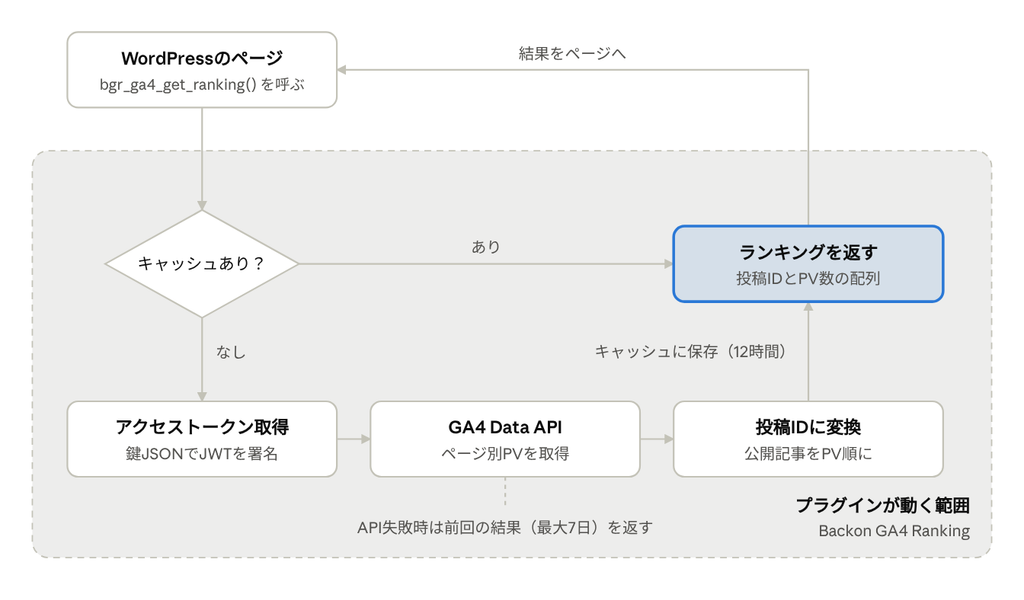
GA4に取りに行くのはキャッシュが切れたときだけ。12時間キャッシュなら1日2回程度なので、サイトは重くならない。
※GA4が落ちていたり通信に失敗したときは、前回の結果(最大7日分)を返す。ランキングが急に消えたり、新着順にすり替わったりはしない。
注意
- Googleの仕様が変わったら自分で直す必要がある。今使っているのは Data API の
v1beta。いま実際に使われているバージョンだけど、将来v1に移ったらURLを書き換えることになる - 通信エラーのときの自動リトライはない(代わりに前回の結果を返すようにしてある)
1ファイルの中に、役割の違う部分が4つ入っている。
backon-ga4-ranking.php
├── プラグイン情報(ヘッダーコメント)
├── class Backon_GA4_Ranking(本体。1つだけ作って使い回す)
│   ├── 起動・フック登録
│   ├── 【A】ランキングを返す(キャッシュ担当)
│   ├── 【B】GA4からデータを取る(通信担当)
│   ├── 【C】認証(鍵 → アクセストークン)
│   └── 【D】管理画面(設定・接続テスト・キャッシュクリア)
└── テンプレート用の関数 2つ
データの置き場所
| 名前 | 保存先 | 中身 | 期限 |
|---|---|---|---|
bgr_settings | オプション | 設定4項目 | なし |
bgr_cache_ver | オプション | キャッシュの世代番号 | なし |
bgr_access_token | トランジェント | アクセストークン | 約55分 |
bgr_rank_xxxx | トランジェント | ランキングの結果 | 12時間(設定で変更可) |
bgr_rank_bk_xxxx | トランジェント | ランキングのバックアップ | 7日 |
bgr_notice_ユーザーID | トランジェント | テスト結果のメッセージ | 1分 |
※プラグインを削除しても、設定(bgr_settings、bgr_cache_ver)はデータベースに残る。完全に消したいときはこの2つのオプションを削除する。る。
セキュリティ対策
- 管理画面の操作は全部、管理者かどうかのチェック+nonceチェック(なりすましの送信を防ぐ)
- 入力値は保存前にサニタイズ、画面に出すときはエスケープ
- 鍵ファイルが公開フォルダ内にあると、設定の保存時にエラーを出す
- GA4に求める権限は読み取り専用(
analytics.readonly)
プラグイン
①backon-ga4-ranking.php
Google公式のPHPライブラリもあるけど、Composerで入れる必要があって依存ファイルも多い。使うのは「鍵でアクセストークンをもらう」「ページ別PVを問い合わせる」の2つの通信だけ。WordPress標準の wp_remote_post() とPHPのOpenSSLだけで作成されている。ファイルを1つ置けば動くし、他のプラグインとライブラリが衝突する心配もない。
<?php
/**
 * Plugin Name:       Backon GA4 Ranking
 * Description:       GA4 Data API(サービスアカウント認証)から投稿のPVランキングを取得する軽量プラグイン。Simple GA Ranking の置き換え用。
 * Version:           1.0.0
 * Requires at least: 6.0
 * Requires PHP:      7.4
 * Author:            backon69
 * License:           GPL-2.0-or-later
 * Text Domain:       backon-ga4-ranking
 *
 * 使い方(テンプレート側):
 *   $ranking = bgr_ga4_get_ranking( array( 'period' => 7, 'limit' => 5 ) );
 *   // => array( 投稿ID => PV数, ... ) をPV降順で返す。取得失敗時は前回成功データ or 空配列。
 *
 * @package Backon_GA4_Ranking
 */

// WordPress 外からの直接アクセスを禁止。
defined( 'ABSPATH' ) || exit;

/**
 * GA4 ランキング本体クラス。
 *
 * 処理の流れ:
 *   1. テンプレートから bgr_ga4_get_ranking() が呼ばれる
 *   2. transient にキャッシュがあればそれを返す(API は叩かない)
 *   3. 無ければサービスアカウント鍵で JWT を作り、アクセストークンを取得(50分程度キャッシュ)
 *   4. GA4 Data API runReport で pagePath × screenPageViews を取得
 *   5. pagePath を url_to_postid() で投稿IDに変換し、公開済み投稿だけを PV 合算・降順ソート
 *   6. 結果を transient に保存(通常キャッシュ+7日間のバックアップ)
 *   7. API 失敗時はバックアップを返す(ランキングが突然消えない/新着順にすり替わらない)
 */
final class Backon_GA4_Ranking {

	const OPTION_KEY      = 'bgr_settings';
	const VERSION_OPTION  = 'bgr_cache_ver';
	const TOKEN_TRANSIENT = 'bgr_access_token';
	const CACHE_PREFIX    = 'bgr_rank_';
	const BACKUP_PREFIX   = 'bgr_rank_bk_';
	const NOTICE_PREFIX   = 'bgr_notice_';
	const PAGE_SLUG       = 'backon-ga4-ranking';
	const SCOPE           = 'https://www.googleapis.com/auth/analytics.readonly';
	const TOKEN_URL       = 'https://oauth2.googleapis.com/token';
	const API_URL         = 'https://analyticsdata.googleapis.com/v1beta/properties/%s:runReport';

	/**
	 * シングルトンインスタンス。
	 *
	 * @var Backon_GA4_Ranking|null
	 */
	private static $instance = null;

	/**
	 * インスタンス取得。
	 *
	 * @return Backon_GA4_Ranking
	 */
	public static function instance() {
		if ( null === self::$instance ) {
			self::$instance = new self();
		}
		return self::$instance;
	}

	/**
	 * フック登録。
	 */
	private function __construct() {
		// 【Action】管理画面「設定」配下にメニューを追加。
		add_action( 'admin_menu', array( $this, 'add_settings_page' ) );

		// 【Action】Settings API で設定項目を登録(nonce は settings_fields() が自動付与)。
		add_action( 'admin_init', array( $this, 'register_settings' ) );

		// 【Action】接続テスト・キャッシュクリアのボタン処理(admin-post.php 経由、nonce チェックあり)。
		add_action( 'admin_post_bgr_test_connection', array( $this, 'handle_test_connection' ) );
		add_action( 'admin_post_bgr_clear_cache', array( $this, 'handle_clear_cache' ) );

		// 【Action】設定が変更されたら、古い条件で作ったキャッシュとトークンを破棄。
		add_action( 'update_option_' . self::OPTION_KEY, array( $this, 'flush_all' ) );
	}

	/* =========================================================
	 * 設定値
	 * ======================================================= */

	/**
	 * 設定値をデフォルトとマージして返す。
	 *
	 * @return array
	 */
	public static function get_settings() {
		$defaults = array(
			'property_id' => '',
			'key_file'    => '',
			'cache_hours' => 12,
			'path_prefix' => '/archives/',
		);
		return wp_parse_args( (array) get_option( self::OPTION_KEY, array() ), $defaults );
	}

	/* =========================================================
	 * ランキング取得(公開API)
	 * ======================================================= */

	/**
	 * ランキングを取得する(キャッシュ優先)。
	 *
	 * @param array $args {
	 *     @type int    $period    集計日数(昨日までの N 日間)。1〜365。
	 *     @type int    $limit     返す件数。1〜100。
	 *     @type string $post_type 対象の投稿タイプ。
	 * }
	 * @return array 投稿ID => PV数(PV降順)。
	 */
	public function get_ranking( $args = array() ) {
		$args = wp_parse_args(
			$args,
			array(
				'period'    => 7,
				'limit'     => 5,
				'post_type' => 'post',
			)
		);

		// 引数を安全な範囲に丸める。
		$period    = min( 365, max( 1, absint( $args['period'] ) ) );
		$limit     = min( 100, max( 1, absint( $args['limit'] ) ) );
		$post_type = sanitize_key( $args['post_type'] );

		// キャッシュキー(条件+キャッシュ世代番号)。世代番号を上げると全キャッシュが一括で無効になる。
		$ver        = (int) get_option( self::VERSION_OPTION, 1 );
		$hash       = md5( wp_json_encode( array( $period, $limit, $post_type, $ver ) ) );
		$cache_key  = self::CACHE_PREFIX . $hash;
		$backup_key = self::BACKUP_PREFIX . $hash;

		// 1. キャッシュがあれば即返す。
		$cached = get_transient( $cache_key );
		if ( is_array( $cached ) ) {
			return $cached;
		}

		// 2. API から取得。
		$result = $this->fetch_ranking( $period, $limit, $post_type );

		if ( is_wp_error( $result ) ) {
			// 失敗時: エラーログに残し、前回成功データ(なければ空)を返す。
			if ( defined( 'WP_DEBUG_LOG' ) && WP_DEBUG_LOG ) {
				error_log( '[Backon GA4 Ranking] ' . $result->get_error_message() ); // phpcs:ignore WordPress.PHP.DevelopmentFunctions.error_log_error_log
			}
			$backup   = get_transient( $backup_key );
			$fallback = is_array( $backup ) ? $backup : array();

			// API 連打防止のため、失敗時は10分だけフォールバックをキャッシュ。
			set_transient( $cache_key, $fallback, 10 * MINUTE_IN_SECONDS );
			return $fallback;
		}

		/**
		 * 【Filter】取得結果を加工したい場合のフック(除外記事の指定など)。
		 *
		 * @param array $result 投稿ID => PV数。
		 * @param array $args   取得条件。
		 */
		$result = (array) apply_filters( 'bgr_ga4_ranking', $result, compact( 'period', 'limit', 'post_type' ) );

		$settings = self::get_settings();
		set_transient( $cache_key, $result, absint( $settings['cache_hours'] ) * HOUR_IN_SECONDS );
		set_transient( $backup_key, $result, 7 * DAY_IN_SECONDS );

		return $result;
	}

	/**
	 * GA4 Data API からランキングを取得(キャッシュなし)。
	 *
	 * @param int    $period    集計日数。
	 * @param int    $limit     件数。
	 * @param string $post_type 投稿タイプ。
	 * @return array|WP_Error
	 */
	private function fetch_ranking( $period, $limit, $post_type ) {
		$settings = self::get_settings();

		if ( '' === $settings['property_id'] ) {
			return new WP_Error( 'bgr_no_property', 'GA4 プロパティIDが未設定です。' );
		}

		$token = $this->get_access_token();
		if ( is_wp_error( $token ) ) {
			return $token;
		}

		// runReport のリクエスト本体。今日は集計途中なので「昨日までの N 日間」にする。
		$body = array(
			'dateRanges' => array(
				array(
					'startDate' => $period . 'daysAgo',
					'endDate'   => 'yesterday',
				),
			),
			'dimensions' => array( array( 'name' => 'pagePath' ) ),
			'metrics'    => array( array( 'name' => 'screenPageViews' ) ),
			'orderBys'   => array(
				array(
					'metric' => array( 'metricName' => 'screenPageViews' ),
					'desc'   => true,
				),
			),
			// トップ・カテゴリ一覧なども混ざるので多めに取ってから投稿だけに絞る。
			'limit'      => 200,
		);

		// パスの前方一致フィルタ(例: /archives/)。記事URL以外を API 側で除外して効率化。
		if ( '' !== $settings['path_prefix'] ) {
			$body['dimensionFilter'] = array(
				'filter' => array(
					'fieldName'    => 'pagePath',
					'stringFilter' => array(
						'matchType' => 'BEGINS_WITH',
						'value'     => $settings['path_prefix'],
					),
				),
			);
		}

		$response = wp_remote_post(
			sprintf( self::API_URL, rawurlencode( $settings['property_id'] ) ),
			array(
				'timeout' => 15,
				'headers' => array(
					'Authorization' => 'Bearer ' . $token,
					'Content-Type'  => 'application/json',
				),
				'body'    => wp_json_encode( $body ),
			)
		);

		if ( is_wp_error( $response ) ) {
			return $response;
		}

		$code = (int) wp_remote_retrieve_response_code( $response );
		$data = json_decode( wp_remote_retrieve_body( $response ), true );

		if ( 200 !== $code ) {
			// 401 ならトークン期限切れの可能性があるので破棄しておく(次回再取得)。
			if ( 401 === $code ) {
				delete_transient( self::TOKEN_TRANSIENT );
			}
			$message = isset( $data['error']['message'] ) ? $data['error']['message'] : 'HTTP ' . $code;
			return new WP_Error( 'bgr_api_error', 'GA4 API エラー: ' . $message );
		}

		$ranking = array();
		if ( empty( $data['rows'] ) || ! is_array( $data['rows'] ) ) {
			return $ranking;
		}

		foreach ( $data['rows'] as $row ) {
			$path = isset( $row['dimensionValues'][0]['value'] ) ? (string) $row['dimensionValues'][0]['value'] : '';
			$pv   = isset( $row['metricValues'][0]['value'] ) ? (int) $row['metricValues'][0]['value'] : 0;

			if ( '' === $path || '/' === $path || $pv <= 0 ) {
				continue;
			}

			// パス → 投稿ID。カテゴリ・タグ一覧などは 0 が返るので除外される。
			$post_id = url_to_postid( home_url( $path ) );
			if ( ! $post_id ) {
				continue;
			}

			// 対象投稿タイプ・公開済み・パスワードなしの記事だけに絞る。
			$post = get_post( $post_id );
			if ( ! $post || $post->post_type !== $post_type || 'publish' !== $post->post_status || '' !== $post->post_password ) {
				continue;
			}

			// 末尾スラッシュ有無などで同じ記事が複数行に分かれるため合算する。
			$ranking[ $post_id ] = isset( $ranking[ $post_id ] ) ? $ranking[ $post_id ] + $pv : $pv;
		}

		arsort( $ranking, SORT_NUMERIC );

		return array_slice( $ranking, 0, $limit, true );
	}

	/* =========================================================
	 * 認証(サービスアカウント → アクセストークン)
	 * ======================================================= */

	/**
	 * アクセストークンを取得(transient に約55分キャッシュ)。
	 *
	 * @return string|WP_Error
	 */
	private function get_access_token() {
		$cached = get_transient( self::TOKEN_TRANSIENT );
		if ( is_string( $cached ) && '' !== $cached ) {
			return $cached;
		}

		if ( ! function_exists( 'openssl_sign' ) ) {
			return new WP_Error( 'bgr_no_openssl', 'PHP の OpenSSL 拡張が無効です。' );
		}

		$key = $this->load_key_file();
		if ( is_wp_error( $key ) ) {
			return $key;
		}

		// JWT(RS256)を組み立てて署名。
		$now    = time();
		$header = array(
			'alg' => 'RS256',
			'typ' => 'JWT',
		);
		$claim  = array(
			'iss'   => $key['client_email'],
			'scope' => self::SCOPE,
			'aud'   => self::TOKEN_URL,
			'iat'   => $now,
			'exp'   => $now + HOUR_IN_SECONDS,
		);

		$unsigned  = $this->base64url( wp_json_encode( $header ) ) . '.' . $this->base64url( wp_json_encode( $claim ) );
		$signature = '';

		if ( ! openssl_sign( $unsigned, $signature, $key['private_key'], OPENSSL_ALGO_SHA256 ) ) {
			return new WP_Error( 'bgr_sign_failed', 'JWT の署名に失敗しました(鍵ファイルの private_key を確認)。' );
		}

		$response = wp_remote_post(
			self::TOKEN_URL,
			array(
				'timeout' => 15,
				'body'    => array(
					'grant_type' => 'urn:ietf:params:oauth:grant-type:jwt-bearer',
					'assertion'  => $unsigned . '.' . $this->base64url( $signature ),
				),
			)
		);

		if ( is_wp_error( $response ) ) {
			return $response;
		}

		$data = json_decode( wp_remote_retrieve_body( $response ), true );

		if ( empty( $data['access_token'] ) ) {
			$message = isset( $data['error_description'] ) ? $data['error_description'] : 'トークン取得に失敗しました。';
			return new WP_Error( 'bgr_token_failed', '認証エラー: ' . $message );
		}

		// 有効期限の5分前に切れるようにキャッシュ。
		$ttl = isset( $data['expires_in'] ) ? (int) $data['expires_in'] - 300 : 3000;
		set_transient( self::TOKEN_TRANSIENT, $data['access_token'], max( 60, $ttl ) );

		return $data['access_token'];
	}

	/**
	 * サービスアカウント鍵(JSON)を読み込む。
	 *
	 * @return array|WP_Error
	 */
	private function load_key_file() {
		$settings = self::get_settings();
		$path     = $settings['key_file'];

		if ( '' === $path || ! is_readable( $path ) ) {
			return new WP_Error( 'bgr_no_key', '鍵ファイルが見つからないか、読み込み権限がありません。' );
		}

		$json = json_decode( (string) file_get_contents( $path ), true ); // phpcs:ignore WordPress.WP.AlternativeFunctions.file_get_contents_file_get_contents

		if ( empty( $json['client_email'] ) || empty( $json['private_key'] ) ) {
			return new WP_Error( 'bgr_invalid_key', '鍵ファイルの形式が正しくありません(client_email / private_key がない)。' );
		}

		return $json;
	}

	/**
	 * Base64URL エンコード(JWT 用)。
	 *
	 * @param string $data 元データ。
	 * @return string
	 */
	private function base64url( $data ) {
		return rtrim( strtr( base64_encode( $data ), '+/', '-_' ), '=' ); // phpcs:ignore WordPress.PHP.DiscouragedPHPFunctions.obfuscation_base64_encode
	}

	/**
	 * 全キャッシュとトークンを破棄(世代番号を進める)。
	 */
	public function flush_all() {
		update_option( self::VERSION_OPTION, (int) get_option( self::VERSION_OPTION, 1 ) + 1, false );
		delete_transient( self::TOKEN_TRANSIENT );
	}

	/* =========================================================
	 * 管理画面
	 * ======================================================= */

	/**
	 * 設定ページを「設定」メニュー配下に追加。
	 */
	public function add_settings_page() {
		add_options_page(
			'GA4ランキング設定',
			'GA4ランキング',
			'manage_options',
			self::PAGE_SLUG,
			array( $this, 'render_settings_page' )
		);
	}

	/**
	 * 設定項目を登録。
	 */
	public function register_settings() {
		register_setting(
			'bgr_settings_group',
			self::OPTION_KEY,
			array(
				'type'              => 'array',
				'sanitize_callback' => array( $this, 'sanitize_settings' ),
				'default'           => array(),
			)
		);
	}

	/**
	 * 設定値のサニタイズ。
	 *
	 * @param mixed $input 送信値(options.php で unslash 済み)。
	 * @return array
	 */
	public function sanitize_settings( $input ) {
		$input = is_array( $input ) ? $input : array();
		$out   = array();

		// プロパティID: 数字以外を除去。
		$out['property_id'] = isset( $input['property_id'] ) ? preg_replace( '/\D/', '', (string) $input['property_id'] ) : '';

		// 鍵ファイルのサーバー上の絶対パス。
		$out['key_file'] = isset( $input['key_file'] ) ? sanitize_text_field( $input['key_file'] ) : '';

		// キャッシュ時間: 1〜48時間。
		$hours              = isset( $input['cache_hours'] ) ? absint( $input['cache_hours'] ) : 12;
		$out['cache_hours'] = min( 48, max( 1, $hours ) );

		// パス前方一致: 先頭スラッシュを補完。
		$prefix = isset( $input['path_prefix'] ) ? sanitize_text_field( $input['path_prefix'] ) : '';
		if ( '' !== $prefix && 0 !== strpos( $prefix, '/' ) ) {
			$prefix = '/' . $prefix;
		}
		$out['path_prefix'] = $prefix;

		// 鍵ファイルが公開ディレクトリ内にある場合は警告(URL で直接ダウンロードされる危険)。
		if ( '' !== $out['key_file'] ) {
			$real = realpath( $out['key_file'] );
			$root = realpath( ABSPATH );
			if ( false === $real ) {
				add_settings_error( self::OPTION_KEY, 'bgr_key_missing', '指定した鍵ファイルが見つかりません。パスを確認してください。', 'warning' );
			} elseif ( false !== $root && 0 === strpos( $real, $root ) ) {
				add_settings_error( self::OPTION_KEY, 'bgr_key_public', '鍵ファイルが公開ディレクトリ内にあります。public_html の外へ移動してください。', 'error' );
			}
		}

		return $out;
	}

	/**
	 * 設定ページの描画。
	 */
	public function render_settings_page() {
		if ( ! current_user_can( 'manage_options' ) ) {
			return;
		}
		$s = self::get_settings();
		?>
		<div class="wrap">
			<h1>GA4ランキング設定</h1>
			<?php $this->render_notice(); ?>

			<form method="post" action="options.php">
				<?php settings_fields( 'bgr_settings_group' ); ?>
				<table class="form-table" role="presentation">
					<tr>
						<th scope="row"><label for="bgr_property_id">GA4 プロパティID</label></th>
						<td>
							<input type="text" id="bgr_property_id" class="regular-text" name="<?php echo esc_attr( self::OPTION_KEY ); ?>[property_id]" value="<?php echo esc_attr( $s['property_id'] ); ?>" inputmode="numeric">
							<p class="description">GA4「管理」→「プロパティの詳細」に表示される数字(G-XXXX の測定IDではない)。</p>
						</td>
					</tr>
					<tr>
						<th scope="row"><label for="bgr_key_file">鍵ファイルのパス</label></th>
						<td>
							<input type="text" id="bgr_key_file" class="large-text code" name="<?php echo esc_attr( self::OPTION_KEY ); ?>[key_file]" value="<?php echo esc_attr( $s['key_file'] ); ?>">
							<p class="description">サービスアカウント JSON のサーバー上の絶対パス。必ず public_html の外に置くこと。</p>
						</td>
					</tr>
					<tr>
						<th scope="row"><label for="bgr_path_prefix">集計対象パス(前方一致)</label></th>
						<td>
							<input type="text" id="bgr_path_prefix" class="regular-text code" name="<?php echo esc_attr( self::OPTION_KEY ); ?>[path_prefix]" value="<?php echo esc_attr( $s['path_prefix'] ); ?>">
							<p class="description">例: /archives/(空欄なら全ページから投稿を抽出)</p>
						</td>
					</tr>
					<tr>
						<th scope="row"><label for="bgr_cache_hours">キャッシュ時間</label></th>
						<td>
							<input type="number" id="bgr_cache_hours" class="small-text" min="1" max="48" name="<?php echo esc_attr( self::OPTION_KEY ); ?>[cache_hours]" value="<?php echo esc_attr( $s['cache_hours'] ); ?>"> 時間
						</td>
					</tr>
				</table>
				<?php submit_button(); ?>
			</form>

			<hr>
			<h2>動作確認</h2>
			<form method="post" action="<?php echo esc_url( admin_url( 'admin-post.php' ) ); ?>" style="display:inline-block;margin-right:8px;">
				<input type="hidden" name="action" value="bgr_test_connection">
				<?php wp_nonce_field( 'bgr_test_connection' ); ?>
				<?php submit_button( '接続テスト(直近7日 TOP5)', 'secondary', 'submit', false ); ?>
			</form>
			<form method="post" action="<?php echo esc_url( admin_url( 'admin-post.php' ) ); ?>" style="display:inline-block;">
				<input type="hidden" name="action" value="bgr_clear_cache">
				<?php wp_nonce_field( 'bgr_clear_cache' ); ?>
				<?php submit_button( 'キャッシュをクリア', 'secondary', 'submit', false ); ?>
			</form>
		</div>
		<?php
	}

	/**
	 * 接続テスト(ボタン押下時)。
	 */
	public function handle_test_connection() {
		// 権限 → nonce の順でチェック。
		if ( ! current_user_can( 'manage_options' ) ) {
			wp_die( esc_html( '権限がありません。' ), 403 );
		}
		check_admin_referer( 'bgr_test_connection' );

		// テストは必ず最新状態で行う。
		$this->flush_all();
		$result = $this->fetch_ranking( 7, 5, 'post' );

		if ( is_wp_error( $result ) ) {
			$notice = array(
				'type'  => 'error',
				'lines' => array( $result->get_error_message() ),
			);
		} elseif ( empty( $result ) ) {
			$notice = array(
				'type'  => 'warning',
				'lines' => array( '接続は成功しましたが、対象記事が0件でした(集計対象パス・期間を確認)。' ),
			);
		} else {
			$lines = array( '接続成功。直近7日間のTOP5:' );
			$rank  = 1;
			foreach ( $result as $post_id => $pv ) {
				$lines[] = sprintf( '%d位 %s(%s PV)', $rank, get_the_title( $post_id ), number_format_i18n( $pv ) );
				++$rank;
			}
			$notice = array(
				'type'  => 'success',
				'lines' => $lines,
			);
		}

		set_transient( self::NOTICE_PREFIX . get_current_user_id(), $notice, MINUTE_IN_SECONDS );
		wp_safe_redirect( admin_url( 'options-general.php?page=' . self::PAGE_SLUG ) );
		exit;
	}

	/**
	 * キャッシュクリア(ボタン押下時)。
	 */
	public function handle_clear_cache() {
		if ( ! current_user_can( 'manage_options' ) ) {
			wp_die( esc_html( '権限がありません。' ), 403 );
		}
		check_admin_referer( 'bgr_clear_cache' );

		$this->flush_all();

		set_transient(
			self::NOTICE_PREFIX . get_current_user_id(),
			array(
				'type'  => 'success',
				'lines' => array( 'キャッシュをクリアしました。次回表示時に GA4 から再取得します。' ),
			),
			MINUTE_IN_SECONDS
		);
		wp_safe_redirect( admin_url( 'options-general.php?page=' . self::PAGE_SLUG ) );
		exit;
	}

	/**
	 * テスト結果などの通知を表示(1回表示したら削除)。
	 */
	private function render_notice() {
		$key    = self::NOTICE_PREFIX . get_current_user_id();
		$notice = get_transient( $key );
		if ( ! is_array( $notice ) || empty( $notice['lines'] ) ) {
			return;
		}
		delete_transient( $key );

		$allowed = array( 'success', 'warning', 'error', 'info' );
		$type    = in_array( $notice['type'], $allowed, true ) ? $notice['type'] : 'info';
		?>
		<div class="notice notice-<?php echo esc_attr( $type ); ?> is-dismissible">
			<?php foreach ( (array) $notice['lines'] as $line ) : ?>
				<p><?php echo esc_html( $line ); ?></p>
			<?php endforeach; ?>
		</div>
		<?php
	}
}

// プラグイン読み込み完了時にフックを登録。
add_action( 'plugins_loaded', array( 'Backon_GA4_Ranking', 'instance' ) );

// 無効化時はアクセストークンを破棄。
register_deactivation_hook(
	__FILE__,
	static function () {
		delete_transient( Backon_GA4_Ranking::TOKEN_TRANSIENT );
	}
);

/**
 * テンプレート用: ランキング取得(投稿ID => PV数)。
 *
 * @param array $args period / limit / post_type。
 * @return array
 */
function bgr_ga4_get_ranking( $args = array() ) {
	return Backon_GA4_Ranking::instance()->get_ranking( $args );
}

/**
 * テンプレート用: ランキングの投稿ID配列だけ取得。
 *
 * @param array $args period / limit / post_type。
 * @return int[]
 */
function bgr_ga4_get_ranking_ids( $args = array() ) {
	return array_keys( bgr_ga4_get_ranking( $args ) );
}
②サーバへ格納
wp-content/plugins/ の中に backon-ga4-ranking フォルダを作って、その中に backon-ga4-ranking.php を格納する。
wp-content/plugins/
└── backon-ga4-ranking/
    └── backon-ga4-ranking.php
※文字コードは UTF-8(BOMなし)で保存する。BOM付きだと画面上部に変な空白が出たり、エラーになったりする。
③有効化する
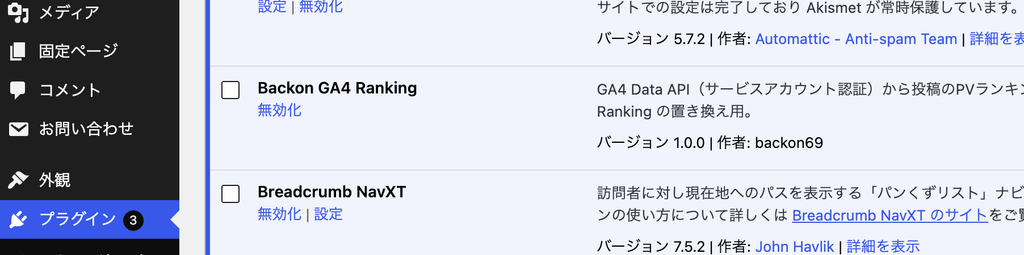
管理画面の「プラグイン」→「Backon GA4 Ranking」→「有効化」。有効化すると「設定」の中に「GA4ランキング」が出てくる。
設定して接続テストする
①設定する
「設定」→「GA4ランキング」を開いて、4項目を入れて「変更を保存」。
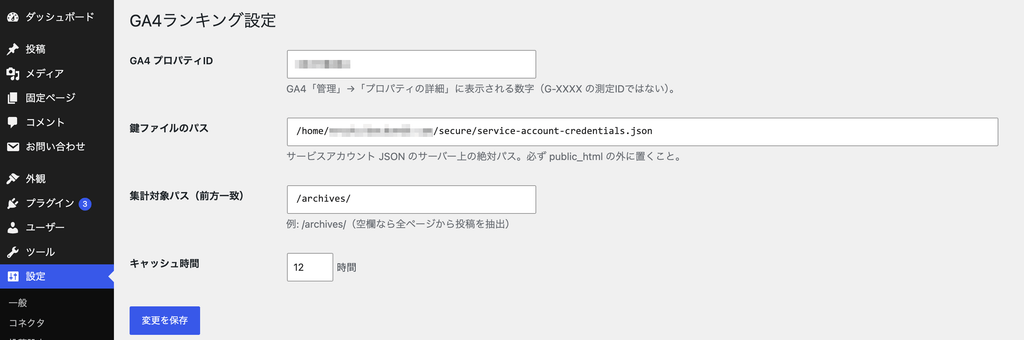
| 項目 | 入れるもの |
|---|---|
| GA4 プロパティID | 前回控えた数字(例:987654321) |
| 鍵ファイルのパス | 前回置いた鍵のフルパス(例:/home/ユーザー名/example.com/secure/service-account-credentials.json) |
| 集計対象パス | 記事URLの共通部分(例:/archives/) |
| キャッシュ時間 | 12(時間) |
※集計対象パスはパーマリンクの形式で変わる。/archives/123 の形なら /archives/、形が違うなら空欄でいい(全ページから記事だけを拾う)。 ※鍵ファイルが public_html の中にあると、保存したときにエラーが出るようにしてある。
②接続テストする
保存したら「接続テスト(直近7日 TOP5)」を押す。うまくいくと、画面の上に直近7日間のTOP5とPV数が出る。

出てきた順位を、GA4の「レポート」→「エンゲージメント」→「ページとスクリーン」(期間:過去7日間)と見比べて、上位が同じ並びならOK。
※テストは毎回キャッシュを捨ててGA4に取りに行くので、何回押しても最新の結果が出る。
うまくいかないとき
自分は「Invalid grant: account not found」でしばらく悩んだ。サーバーに置いていたのが、もう消した古いサービスアカウントの鍵だった。今あるサービスアカウントで鍵を作り直して差し替えたら一発で通った。
| エラーメッセージ | 原因 | 対処 |
|---|---|---|
| 鍵ファイルが見つからないか、読み込み権限がありません | パスの綴り違い、パーミッション | パスを確認。フォルダ705・ファイル604に緩める |
| 認証エラー: Invalid grant: account not found | 鍵のサービスアカウントがもう存在しない | 今あるサービスアカウントで鍵を作り直して差し替える |
| 認証エラー: invalid_grant | 鍵が削除されている、サーバーの時刻がずれている | 鍵を作り直す |
| GA4 API エラー: …has not been used in project… | Data APIが有効になっていない | Google Cloudで Google Analytics Data API を有効にする(反映まで数分) |
| GA4 API エラー: User does not have sufficient permissions | GA4にサービスアカウントを追加していない | GA4のプロパティのアクセス管理に client_email を閲覧者で追加 |
| 接続は成功しましたが、対象記事が0件でした | プロパティIDが別サイト、集計対象パスが合っていない | プロパティIDを確認。集計対象パスを空欄にして再テスト |
※鍵を差し替えたら、先に「キャッシュをクリア」を押してからテストする。 ※複数サイトで使うときは、プロパティIDの取り違えに要注意。パーマリンクが同じ形式だとエラーにならず、番号が一致した無関係な記事が並んでしまう。
これでGA4からランキングを取る準備はできた。テンプレートからはこう呼ぶだけで、投稿ID => PV数 の配列がPVの多い順に返ってくる。
$ranking = bgr_ga4_get_ranking( array( 'period' => 7, 'limit' => 5 ) );
// => array( 123 => 10, 456 => 8, ... )
次回は表示編。これを使って人気記事のページを作る。
NOTICES
- 記事内容は実装させたものがほとんどですが自己責任で参考にしてください。